








Pachuca 2
Col Condesa
CDMX
For years, the rule of digital marketing in Australia was clear: win on Google, secure the click, and control the customer journey. Our success was measured in familiar, comfortable metrics—organic traffic, click-through rates, and keyword rankings.
That entire model is being fundamentally disrupted.
A new generation of "answer engines"—led by Google's AI Overviews, ChatGPT, and emerging players like Perplexity—is redefining how Australians find information. These platforms don't just provide a list of links anymore; they synthesise information and deliver a direct, conversational answer.
This creates a massive new blind spot for businesses. When a user in Sydney clicks a link within a ChatGPT response, how does that appear in your Google Analytics 4? Is it "Referral"? "Direct"? Or does it vanish into the void of misattribution? If you can't measure this traffic, you can't optimise for it. You are flying blind in what is rapidly becoming the most important new channel for customer acquisition.
At SEOTopSecret, our name defines our mission: we uncover the hidden strategies that deliver a real competitive edge. Today, we're revealing one of our internal methods. This isn't a theoretical article; it's a practical playbook. We will show you, step-by-step, how to "unlock" your GA4 account to track the traffic you're already getting from AI, and what this data means for your business strategy.
The Problem: The AI Attribution Black Hole
The lack of a default "AI Traffic" category in GA4 isn't just a reporting headache; it's a serious business problem. It means the true ROI of your investment in high-quality content and brand authority is being systematically understated. Every click from a Perplexity answer is a high-quality signal: an AI has judged your content to be a source of truth. But if that click is mislabelled as "Direct" or lost in a sea of generic "Referrals," you never learn which of your pages are your true champions in the AI era.
To win, you first need a way to keep score. That’s what we are going to build.
The SEOTopSecret Method: Your 5-Step AI Traffic Report
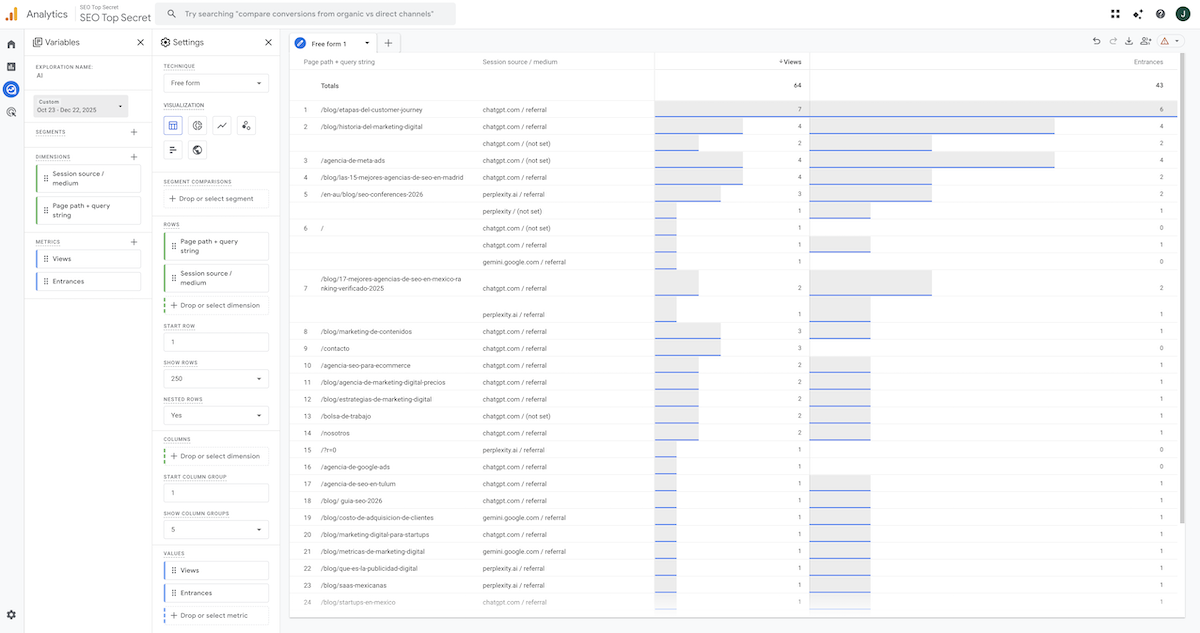
This process will allow you to build a custom exploration report in GA4 to isolate and analyse traffic coming from the most important AI platforms.
Step 1: Navigate to the "Explore" Section in GA4
In your Google Analytics 4 dashboard, click on the "Explore" icon in the left-hand menu. This is where you build advanced reports that go beyond the standard views. Start a new, blank exploration.
Step 2: Set Up Your Dimensions
Dimensions define what you're reporting on (e.g., which source, which page). In the "Variables" column, click the + icon next to "Dimensions" and import the following two:
- Session source / medium
- Page path and screen class
Step 3: Set Up Your Metrics
Metrics define how much you're reporting on (e.g., how many views). In the "Variables" column, click the + icon next to "Metrics" and import these two:
- Views
- Entrances
Step 4: Build Your Report Tab
Now, drag the variables you’ve imported into the "Tab Settings" column on the right:
- Drag Session source / medium and Page path... into the "Rows" area.
- Enable the "Nested rows" toggle. This is critical as it will allow you to see which specific pages are driving traffic from each individual AI source.
- Drag Entrances and Views into the "Values" area.
- Under "Rows," increase the "Show rows" number to 250 or higher to ensure you see a comprehensive list.
Step 5: The "Secret" – Apply the AI Source Filter
This is the key step. Here, we will instruct GA4 to only show traffic originating from domains associated with major AI platforms.
- Under the "Filters" section, click to create a new filter and select Session source / medium.
- Choose the condition matches regex.
- In the "Enter expression" field, paste the following string exactly as it is:
.*chatgpt.*|.*openai.*|.*neeva.*|.*writesonic.*|.*nimble.*|.*outrider.*|.*perplexity.*|.*edgeservices.*|.*gemini.*google.*|.*copilot.*|.*claude.*|.*mistral.*|.*meta.*|.*jasper.*|.*deepmind.*|.*copy.*ai.*Once you apply this filter, your report will instantly transform into a clear, actionable list showing you exactly how much traffic you're receiving from platforms like ChatGPT, Copilot, Perplexity, and Gemini, broken down by the exact landing pages.
From Data to Strategy: How to Interpret Your AI Traffic Report
Having the report is the first step. The real value comes from strategic interpretation. This data is a diagnostic tool for your AI and SEO strategy.
1. Identify Your "Citable" Content Assets:
The pages that appear most frequently in this report are your business's "crown jewels" for the AI era. They are the pieces of content that AI models deem so clear, well-structured, and authoritative that they are being used as foundational sources for their answers.
- Actionable Insight: Analyse the structure of these winning pages. Do they use lists and tables? Do they answer questions directly? Are they written by credible authors? Replicate this successful formula in your future content marketing efforts.
2. Discover Your Authority Gaps:
Just as important is what doesn't appear in the report. If key service or product pages for your Australian market are getting zero traffic from AI sources, it’s a major red flag.
- Actionable Insight: These pages likely lack the depth, structure, or trust signals (E-E-A-T) that AI algorithms prioritise. This gives you a clear, data-driven roadmap of which content to optimise next.
3. Validate Your Brand Strength:
Seeing significant AI traffic directed to your homepage or "About Us" page is an excellent signal. It indicates that users aren't just asking generic questions; they are asking specific questions about your brand, and the AI is pointing to you as the primary source of truth about yourself.
4. Measure the ROI of Your Authority Content:
You can now start attributing real business outcomes to your AI visibility. If a landing page is driving high traffic in your AI report and has a strong lead conversion rate, you've found a winning formula. You can now measure the direct ROI of being a trusted source for AI.
In the AI Era, Your Job is to Be the Source of Truth
The SEO battlefield has expanded. It is no longer enough to optimise for the "ten blue links" of traditional Google search. The Australian brands that will win in the coming years are those who understand that their content must be so good, so clear, and so authoritative that it becomes the foundational source for AI answer engines.
The method we've shared today gives you the power to start measuring this crucial new channel. It allows you to lift the veil and see a part of your traffic future that, until now, has been hidden in plain sight.
At SEOTopSecret, we don't just help you measure the future; we help you build it. Our entire approach is focused on transforming your brand into an undeniable authority, ensuring that no matter how the search interface evolves, you remain the definitive answer.
Are you ready to stop ignoring your AI-driven traffic and start building a strategy to dominate it?
